
- Home
- Fishing Tools
- Weighted Average Calculator
Weighted Average Calculator
Enter up to three values and their weights to find a weighted average that accounts for different fishing session lengths.
How it works, step by step
- Enter each session rate as a value and its elapsed minutes as the corresponding weight.
- Set a row’s weight to zero if you are using fewer than three rows.
- Read the result in the same units as your values, such as coins per hour.
Examples with real results
| Input | You get |
|---|---|
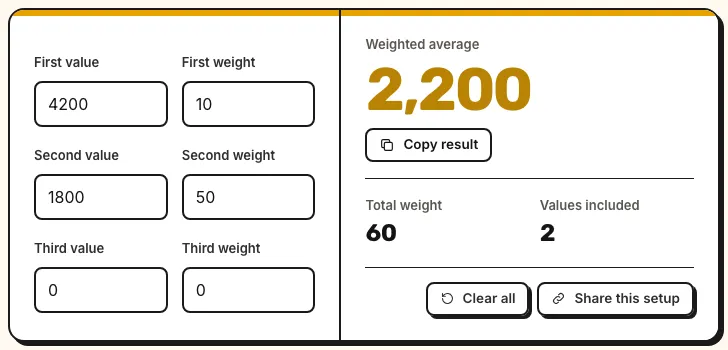
| Ten-minute and fifty-minute fishing runs First value: 4200 · First weight: 10 · Second value: 1800 · Second weight: 50 · Third value: 0 · Third weight: 0 | Weighted average: 2,200 Total weight: 60 |
| Equal weights First value: 800 · First weight: 5 · Second value: 1600 · Second weight: 5 · Third value: 0 · Third weight: 0 | Weighted average: 1,200 Total weight: 10 |
| Include an unprofitable run First value: -300 · First weight: 20 · Second value: 2100 · Second weight: 40 · Third value: 900 · Third weight: 60 | Weighted average: 1,100 Total weight: 120 |
The method behind it
Add the weights. Divide each positive weight by that total to find its share.
Multiply each value by its share and sum the products. This is the weighted arithmetic mean, equivalent to dividing the sum of value times weight by the sum of weights.
For hourly fishing rates, weighting by time is equivalent to adding the coins from all runs and dividing by their total elapsed hours.
Cost, sign-up and privacy
- Cost
- Free forever at $0, with unlimited uses and no daily limit.
- Account
- No login and no sign-up.
- Privacy
- Your input stays in your browser and we do not store it.
- Branding
- Nothing is stamped on your output: no watermark and no logo.
- Output
- Copy the answer as plain text (TXT), or copy a link that keeps your inputs.
When should you use a weighted average calculator?
Use this free weighted average calculator when rates come from observations of unequal length. A 10-minute run earning 4,200 coins per hour netted 700 coins. A 50-minute run at 1,800 an hour netted 1,500. Together they lasted 60 minutes and earned 2,200 coins. Averaging the hourly rates directly would give 3,000, which treats both time windows as equally long.
Choose weights that answer your question
Use run length when you want to know how much you earned per hour across the whole observation. Use equal weights when you want the mean of the individual run rates and have a reason to give each run the same influence. Both calculations can be correct for different questions. Keep entries together only if the rates use the same accounting rule for bait, travel, and selling. Start with the Fishing Session Calculator to calculate the individual rates.
Record additional runs without losing their weights
To combine more than three trips, reuse a pooled result as a value with its original total weight. For example, if two observations pool to 2,200 coins per hour and lasted 60 minutes, carry them forward as 2,200 with a weight of 60. Add a third run at 1,300 for 30 minutes and the pooled rate becomes 1,900. If you are working from rounded hourly rates and still have the original coin totals, pooling from the raw totals preserves more precision.
Use the calculator with your run log
The first two defaults are illustrative session rates. They represent 700 net coins over 10 minutes and 1,500 net coins over 50 minutes. Enter each hourly rate beside its time in minutes. The result of 2,200 coins per hour agrees with adding the 2,200 net coins and dividing by one combined hour. A simple mean of the two hourly rates would give 3,000. An unusually profitable short run would get the same influence as a run five times longer. Start from the fishing run log to compare pooled rates separately for a baseline rod and its trial replacement.
Things to keep in mind
- Use one unit for all values and one common unit for all weights.
- The calculator accepts up to three rows and requires at least one positive weight.
- A pooled rate represents the time actually observed. It can conceal variation between spots or between runs.
Questions people ask
How does the weighted average calculator work?
It multiplies each value by its share of the total weight and adds the results. Rates of 4,200 and 1,800 weighted by 10 and 50 minutes give 2,200.
What is the difference between an average and a weighted average?
A simple average gives each row equal influence. A weighted average gives more influence to a row with a larger weight.
Do the weights have to add up to 100?
No. Enter minutes, counts, or other nonnegative weights directly. The calculator divides by their total.
How do I ignore the third row?
Set its weight to zero. The row will contribute neither its value nor its weight.
Can a value be negative?
Yes. A session with a net loss may have a negative hourly rate, while its duration remains nonnegative.
Can I mix minutes and hours in the weights?
Convert them to the same unit first. For example, enter 30 and 90 minutes for runs lasting half an hour and an hour and a half.
Reviewed Built and tested by Secret Animals Guide team